
Chevrolet Silverado: Driving and Operating / Starting and Operating
Chevrolet Silverado 2019-2026 Owners Manual / Driving and Operating / Starting and Operating
- New Vehicle Break-In
- Ignition Positions (Keyless Access)
- Ignition Positions (Key Access)
- Starting the Engine
- Stop/Start System
- Engine Heater
- Retained Accessory Power (RAP)
- Shifting Into Park
- Shifting out of Park
- Active Fuel Management
- Extended Parking
 Truck-Camper Loading Information
A vehicle-specific Truck-Camper Loading Information label is attached to the
inside of the vehicle's glove box. This label indicates if a slide-in camper can
be carried, how much of a load the vehicle can carry, and how to correctly spread
out the load...
 New Vehicle Break-In
Caution
The vehicle does not need an elaborate break-in. But it will perform better
in the long run if you follow these guidelines:
Keep the vehicle speed at 88 km/h (55 mph) or less for the first 805
km (500 mi)...
Other information:
Kia EV2 (QV1, 2026-2026) Owner's Manual: Reverse Parking Collision-Avoidance Assist settings
Parking Safety Driver Assistance Parking Safety Backward Safety Whilst the vehicle ignition is ON, tap Setup > Vehicle > Driver Assistance > Parking Safety directly on your central infotainment system screen to configure your preferences...
Chevrolet Silverado 2019-2026 Owners Manual: Delayed Locking
If equipped, this feature delays the locking of the doors until five seconds after all doors are closed. Delayed locking can only be turned on when the Open Door Anti-Lockout feature has been turned off. When is pressed on the power door lock switch while the door is open, a chime will sound three times indicating delayed locking is active...
Categories
- Manuals Home
- 4th Generation Silverado Owners Manual
- 4th Generation Silverado Service Manual
- Power Outlets
- Tire Chains
- Driver Information Center (DIC) (Midlevel and Uplevel)
- New on site
- Most important about car
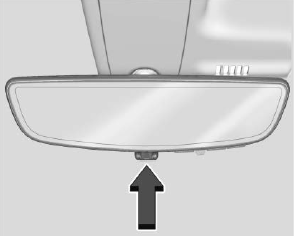
Rear Camera Mirror
If equipped, this automatic dimming mirror provides a wide angle camera view of the area behind the vehicle.

Copyright © 2026 www.chsilverado.com